Pocket Landlord Build Your Town Waterpark Island
Build a splash destination without draining apartment profits.
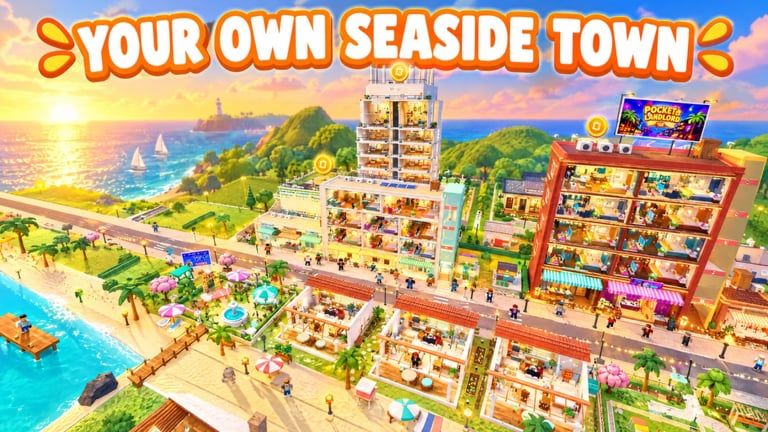
Waterpark island is listed as OPEN on the Pocket Landlord Build Your Town experience page. For landlords who already decorate apartments and run café/gym/karaoke businesses, the island is the vacation-layer expansion: slides, pools, and resort energy that make six-player visits feel like a trip.
Clarifier: Waterpark island is the SlideCity waterpark destination—the same tropical island expansion family called out when official banners say [NEW EXPANSION] SLIDECITY beside Waterpark island OPEN! Expect slides, splash coins, holiday flats, lazy river / wave pool energy, plus landmark passes such as Volcano and Shark Reef Tower. Keep this page for ride-and-resort planning and cross-link SlideCity for expansion framing; do not budget them as two unrelated maps.
This guide covers prep, spending order, Prestige caution, and how Waterpark pairs with SlideCity. New players should still clear Getting Started before booking island tickets with rent money they need tomorrow.
Why Waterpark matters
UGDEVS framed Pocket Landlord as a town builder: paint rooms, recruit pet tenants, collect rent, expand housing, unlock neighborhoods, then add destinations. Waterpark answers the “where do guests go on weekends?” question. A strong island:
- Extends session length for friends touring your town
- Creates screenshot moments distinct from indoor apartments
- Diversifies fantasy beyond residential corridors
- Gives you a post-Prestige rebuild goal that feels fresh
It does not replace Room 101 fundamentals. Prestige still snaps you back to the starter room with a permanent rent bonus—island props vanish with the rest of your layout.
Overview video context
Watch the overview-style gameplay below to recalibrate pacing and UI expectations before you commit a full bankroll to island props.
Unlock and funding prep
Before you ferry budget to Waterpark:
- Confirm apartment rent covers daily furniture experiments with surplus
- Fill key units with dog, cat, and bunny tenants so vacancies are rare
- Level neighborhoods enough that travel/unlock gates are not a surprise sink
- Decide whether SlideCity is mid-build; avoid funding two mega projects in parallel on a fresh account
- Record your Prestige tier (P1–P10+ multipliers) so you know rebuild speed after a reset
If cash is tight, delay Waterpark and push a cheaper paint/furniture refresh instead.
Island build order that usually works
Phase A — Arrival & readability
Create a clear spawn-to-park path. Players hate swimming through unfinished scaffolding. Signage, color bands, and a single hero slide silhouette help guests orient in seconds.
Phase B — Core splash loop
Place a primary slide or pool cluster that looks complete even if wings are empty. A finished center reads better than five half-built attractions.
Phase C — Services
Mirror town businesses: snack stands, locker vibes, seating. Pocket Landlord already trains you to open café/gym/karaoke—reuse that service instinct so the island feels staffed.
Phase D — Pet & photo corners
Tenants bring pets. Quiet decks and shaded props keep the “landlord with cute animals” brand alive beside loud rides.
Phase E — Flex wings
Only then expand into experimental ride sets or luxury yacht-adjacent flex space if your script-curious friends mention AUTO YACHT style goals—manual builders can ignore automation entirely (Scripts Hub).
Economy tips unique to Waterpark
- Do not zero the apartment budget. Island flex should be surplus spending.
- Theme thriftily. Recolor before repurchasing near-duplicate props.
- Measure visits. If friends AFK in apartments instead of the island, your pathing or arrival experience needs work.
- Event awareness. Launch banners sometimes pair with gifts—check Codes whenever Waterpark is promoted again.
Prestige and Waterpark
Permanent multipliers (P1 +50% through diamond and cosmic ranks) accelerate rebuilds, but island content is layout-heavy. Practical advice:
- Prestige before a massive island spend if you were already one session from reset
- Prestige after a showcase-ready island only if you accept rebuilding it under the new bonus
- Never Prestige mid-purchase flow when menus still hold unpaid carts
Track badge progress on Badges, including special tenant badges like ethn, while you chase island goals.
Waterpark vs SlideCity
They describe one tropical island family. SlideCity is the expansion headline; Waterpark is the splash-park checklist (slides, splash coins, holiday flats, lazy river/wave pool, Volcano + Shark Reef Tower). Sequence suggestion:
- Rent-positive apartments
- One coherent Phase A–C Waterpark / SlideCity island core
- Prestige evaluation
- Deeper ride wings or other destinations (Tokyo, Chongqing) funded by the stronger multiplier
Return to the parent Updates Hub whenever UGDEVS flips new event text.
Related pages
Frequently Asked Questions
Quick answers about codes, prestige, rent, and town building.
Is Waterpark island open in Pocket Landlord?
Yes. The Roblox experience advertises Waterpark island as OPEN. It is the SlideCity waterpark destination—same tropical island family under two banners.
Are Waterpark and SlideCity different places?
No. Official copy pairs SlideCity with Waterpark island OPEN. Use both wiki pages for planning angles, but fund one island core.
Will Prestige delete my Waterpark builds?
Prestige resets you to Room 101 and wipes layout progress while keeping the permanent rent bonus. Plan island spending around that reality.
Should Waterpark replace my apartments?
No. Keep residential rent healthy. Treat the island as a destination layer on top of apartments, lofts, villas, and pet tenants.
What should I build first on the island?
A clear arrival path and one complete core splash cluster. Expand wings only after the center looks finished and services exist.