Pocket Landlord Build Your Town Decorating & Room Design
Paint, floors, and furniture layouts that look cozy and keep tenants paying.
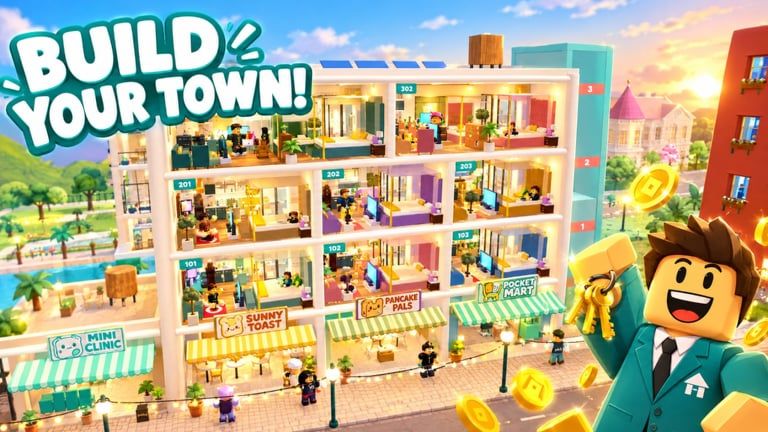
Decorating is half the fantasy of Pocket Landlord Build Your Town and half the business plan. UGDEVS built a cozy Roblox landlord tycoon where paint colors, floor choices, and furniture placement turn empty shells into homes people want to rent - sometimes with dogs, cats, or bunnies in tow. This guide focuses on practical beauty: rooms that screenshot well and stay easy to manage.
Play on Roblox Pocket Landlord Build Your Town, keep Make Money open for budget rules, and consult the furniture tier list before big catalog splurges. New players should finish Getting Started first.
Decorating goals that matter
- Readable rooms - guests understand the space in one glance.
- Clear paths - tenants (and you) can move without obstacle mazes.
- Cohesive palettes - walls, floors, and soft furnishings agree.
- Functional clusters - sleep, sit, store, and play zones make sense.
- Pet-aware spacing - leave room for pet life when units allow animals.
- Rebuildability - designs you can recreate quickly after prestige.
If a layout only looks good from one camera angle and fails every other test, redesign.
Paint and floors first
Always lock surfaces before shopping the entire furniture catalog.
Paint tips
- Pick a dominant wall color and a quieter trim or accent.
- Warm neutrals flatter most furniture lines and photograph softly.
- Bold feature walls work in lofts and karaoke-adjacent lounges; keep bedrooms calmer.
- Match neighborhood vibes - a cafe-heavy block can share creamy tones across residential lobbies.
Floor tips
- Use durable-looking textures in entry paths; softer looks in bedrooms.
- Keep floor changes intentional (hallway vs living zone), not random tile spam.
- High-contrast floors can energize gyms and entertainment rooms; residences often prefer harmony.
Surfaces are cheap relative to mistaken furniture stacks. Fix them early every prestige rebuild.
Furniture placement framework
The four-zone apartment
Most residential units behave well with four zones:
- Sleep - bed with breathing room on at least one side.
- Lounge - seating oriented toward a focal point (window, TV, art).
- Storage / utility - shelves, dressers, practical pieces near entrances.
- Flex - desk, pet corner, plant nook, or hobby clutter kept contained.
Loft adjustments
Lofts love vertical storytelling. Define a downstairs social zone and an upstairs quiet zone even if the footprint is open. Rugs and lighting do as much work as walls.
Villa adjustments
Villas tempt over-decorating. Anchor each room with one hero piece, then support it - do not place five heroes that fight. Outdoor-adjacent spaces should echo interior palettes so the property feels designed, not pasted.
Shopping with landlord brains
Not every cute chair is a good investment. Use this buy order:
- Bed / primary comfort piece
- Seating for the lounge zone
- Lighting (dark rooms feel cheap even with expensive sofas)
- Storage
- Tables and surface clutter
- Plants, art, and flex decor
Cross-check value on the furniture tier list. S-tier practical pieces fund A-tier flex pieces. Pure vanity buys wait for surplus described in the money guide.
Color stories that travel across a town
Pick a neighborhood palette - for example blush accents with warm wood, or cool greys with soft purple lighting that nods to the wiki theme - and reuse it across apartments so your town feels authored. Businesses can intensify the palette: cafe warmth, gym contrast, karaoke neon, without abandoning the residential base colors.
When SlideCity or Waterpark content lands, decide whether those zones get a sibling palette or a vacation contrast. Read SlideCity and Waterpark for destination context, then decorate with intent instead of dumping random event items everywhere.
Pet-friendly decorating
If tenants bring dogs, cats, or bunnies, leave clear floor lanes and avoid blocking interaction spots with decorative spam. Soft corners and visible food/play space (when the game surfaces those needs) keep happiness higher. More care tips sit in Tenants & Pets.
Happy pets are a decorating constraint and a storytelling gift - a bunny corner can become your town’s signature screenshot.
Common decorating mistakes
- Furniture before paint. You will repaint anyway and hate the clash.
- Edge hugging. Pull pieces into conversational groups; leave wall gaps for art later.
- No lighting plan. A dark villa looks unfinished in every trailer thumbnail.
- Identical clutter in every room. Templates are good; clone-stamped mess is not.
- Ignoring business adjacency. A silent luxury hallway beside karaoke may want acoustic-looking buffers or transitional decor.
- Prestige amnesia. If you cannot rebuild the look in fifteen minutes, simplify before you reset.
Session workflow
- Choose room purpose (sleep-heavy apartment, loft lounge, villa suite).
- Paint + floor.
- Place zone anchors.
- Add lighting and storage.
- Detail with plants/art.
- Walk the path as if you were the tenant.
- Screenshot the keeper angles for post-prestige memory.
- Only then open the shop for a luxury flex.
Between rooms, collect rent and check tenants so decorating never bankrupts the Make Money plan. Redeem Codes when decor crates or cash gifts appear.
Syncing decor with progression
Early game: prioritize rentable clarity over museum density. Mid game: specialize rooms and open cafe / gym / karaoke spaces with matching interiors - see businesses tier list. Late game: chase diamond and cosmic prestige rebuilds where your best templates return faster each cycle.
Browse the Guides hub for the full loop, track flair milestones on Players and badges, and keep official destinations handy via Wiki links. Avoid unsafe shortcuts listed under Scripts - a banned account cannot show off your karaoke booth.
Inspiration without copying chaos
Watch town-build footage, note three ideas max per session, and implement them in your palette. Unlimited inspiration tabs create unlimited unfinished rooms. Pocket Landlord rewards finished cozy spaces more than infinite mood boards.
Decorate like a landlord who loves design: beautiful, walkable, pet-aware, and ready to rebuild when permanent rent multipliers call you back to Room 101.
Frequently Asked Questions
Quick answers about codes, prestige, rent, and town building.
Should I paint or buy furniture first?
Paint and floors first. Surfaces set the palette so furniture purchases match and rooms look finished sooner.
How do I decorate after a prestige reset?
Reuse screenshots and templates: surfaces, zone anchors, lighting, then details. Speed matters more than reinventing every sofa.
Does decorating affect tenants and pets?
Clear, complete, pet-aware rooms are easier to keep happy. Cluttered unfinished spaces slow the cozy rent loop.
Where should I spend limited cash on furniture?
Follow essentials first, then check the furniture tier list for investment value before luxury flex pieces.
Any tips for cafe, gym, or karaoke interiors?
Keep a town-wide palette, then intensify mood per business - warm cafe, high-contrast gym, neon karaoke - without clashing residences.