Pocket Landlord Build Your Town Getting Started Guide
Claim Room 101, decorate your first units, collect rent, and grow a cozy Roblox town.
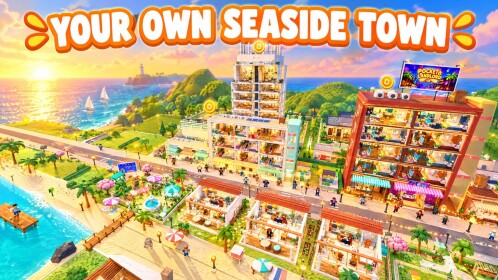
Pocket Landlord Build Your Town is a cozy Roblox landlord tycoon from UGDEVS | Underground Developers. You paint walls, lay floors, place furniture, welcome tenants (often with dogs, cats, or bunnies), collect rent, and slowly turn a starter footprint into apartments, lofts, villas, and lively neighborhood businesses. This beginner guide gets you through the first sessions without wasting cash on the wrong upgrades.
Play on Roblox Pocket Landlord Build Your Town after you skim the checklist below. For live promo gifts, keep the Codes hub open in another tab.
What you are trying to do
Your loop is simple on paper and deep in practice:
- Improve living spaces so they look inviting and functional.
- Attract and keep tenants (and their pets) happy enough to pay rent.
- Reinvest rent into more rooms, better furniture, and town businesses.
- Level neighborhoods, unlock expansions, and eventually prestige for permanent rent multipliers.
You do not need to rush prestige on day one. Early power comes from clean rooms, steady tenants, and a cafe / gym / karaoke plan that matches your cash flow. Read How to Make Money once rent is coming in; save the Prestige guide for when Room 101 no longer feels like a ceiling.
First session checklist
1. Learn the landlord UI
Open the menus that cover paint, furniture, tenant status, and rent collection. Note where happiness or needs appear so you are not guessing why a unit sits empty. If a tutorial prompt appears, finish it fully - it usually unlocks the habits you will repeat for dozens of hours.
2. Fix Room 101 before buying everything
Start with paint and floors. Neutral or warm tones photograph well and make furniture pop. Add essential pieces first: bed, seating, storage, lighting, and a clear walking path. Crowding every tile looks busy and can make rooms harder to manage. Detailed layout advice lives in the Decorating guide; investment priority for pieces is ranked on the furniture tier list.
3. Invite your first tenants
Once a room feels complete, list it or follow the in-game flow to welcome tenants. Prefer occupants you can support - if pets are allowed, confirm you can keep dogs, cats, or bunnies comfortable. The Tenants & Pets page explains happiness habits so rent does not stall.
4. Collect rent on a rhythm
Check units regularly. Early cash should fund the next room upgrade or a missing furniture gap, not every cosmetic the shop flashes. Track which rooms pay reliably; those layouts become templates for lofts and villas later.
5. Expand housing types carefully
Move from basic apartments into lofts and villas when you can furnish them without going broke. Empty prestige shells look impressive and earn poorly. One finished loft beats three half-painted shells.
6. Open a neighborhood business when ready
A cafe, gym, or karaoke venue diversifies income and levels the neighborhood. Compare options on the businesses tier list before you commit. You do not need every business on day one - sequence them with the money guide.
Early progression priorities
Priority A - Habitable rooms. Paint, floors, and core furniture that make a unit rentable.
Priority B - Tenant retention. Respond to needs, keep pets happy, and avoid neglecting units after the first rent tick.
Priority C - Second and third units. Multiply rent before chasing rare decor.
Priority D - First business. Pick one neighborhood venue that fits your theme and cash.
Priority E - Prestige planning. Learn multipliers on the Prestige guide and prestige ranks tier list, then prestige when the permanent bonus outweighs rebuilding time.
Town building without overwhelm
Pocket Landlord shines when neighborhoods feel lived-in. Cluster related rooms, keep color stories consistent across a floor, and leave space for future expansions such as SlideCity and the Waterpark island. When those destinations unlock, read SlideCity and Waterpark so you know what changed.
Use the Guides hub as your map: decorating, money, pets, and prestige pages cross-link so you never have to memorize the whole meta at once. The Tier List hub is the short form of “what to buy next.”
Common beginner mistakes
- Prestiging instantly. The reset to Room 101 is real. Permanent multipliers help only if you can rebuild efficiently. Wait until you understand rent cadence.
- Furniture before fundamentals. Fancy chairs in an unpainted room waste rent potential. Fix surfaces and flow first.
- Ignoring pets. Dogs, cats, and bunnies are part of the cozy fantasy and the happiness equation. Neglect shows up in slower progress.
- Opening every business at once. Cash fragmentation stalls housing upgrades. Sequence cafe, gym, and karaoke with intent.
- Skipping codes. Free rewards accelerate early rooms - redeem on the Codes page when drops are active.
- Unsafe scripts. If you research automation, read Scripts and auto-farm notes and understand Roblox account risk first.
First-week goals
By the end of your first focused week you ideally have:
- Several finished, renting rooms with coherent decor
- At least one pet-friendly tenant setup you can maintain
- A clear rent collection habit
- One neighborhood business online or funded
- A written plan for your first prestige multiplier
After that, deepen systems with Make Money, polish spaces with Decorating, and stabilize the cozy loop with Tenants & Pets. Track badges on Players and badges if you enjoy collectible milestones.
Controls and session tips
Play in short loops: decorate one room, check tenants, collect rent, bank a purchase decision, then stop. Long sessions tempt impulse buys. Screenshot layouts you like so rebuilds after prestige are faster. Join with friends if the experience supports social visits - showing off a karaoke corner or villa deck is half the fun of a landlord tycoon.
Pocket Landlord Build Your Town launched around 20 October 2026 and quickly drew a large Roblox audience. Expect balance and expansion tweaks from UGDEVS; revisit this wiki’s Updates hub after major patches so your beginner habits stay aligned with live systems.
When you are ready for visual rankings, jump to furniture, businesses, and prestige ranks. When you are ready to reset for power, open the Prestige guide and confirm the multiplier you are chasing before you tap the button.
Frequently Asked Questions
Quick answers about codes, prestige, rent, and town building.
What should I do first in Pocket Landlord Build Your Town?
Finish the tutorial, paint and furnish Room 101 with essentials, then attract a tenant before spending on luxury decor.
When should beginners prestige?
After you understand rent collection and can rebuild quickly. Prestige resets you to Room 101 but adds a permanent rent multiplier.
Do tenants really bring pets?
Yes - dogs, cats, and bunnies appear in the cozy loop. Keep them happy so units stay productive; see the Tenants & Pets guide.
Which business should I open first?
Compare cafe, gym, and karaoke on the businesses tier list, then open one you can afford without starving housing upgrades.
Where do I redeem codes?
Follow the steps on the Codes hub whenever UGDEVS releases active promo rewards.