Pocket Landlord Build Your Town Guides & Walkthroughs
From Room 101 to cosmic prestige - every landlord tutorial in one place.
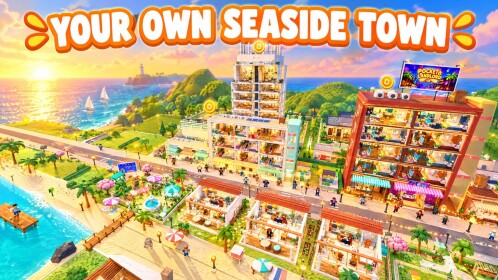
Welcome to the Pocket Landlord Build Your Town guides hub. This cozy Roblox landlord tycoon from UGDEVS | Underground Developers lets you decorate apartments, welcome tenants with pets, open neighborhood businesses, climb Prosperity into new districts, and prestige for permanent rent multipliers. Use the walkthroughs below whether you just claimed Room 101 or you are planning a jade-to-diamond prestige push through Tokyo hillsides and Chongqing neon.
Play on Roblox Pocket Landlord Build Your Town when you are ready to try a tip live. Cross-check active codes, furniture and prestige tier lists, gamepasses, and SlideCity / Waterpark / Tokyo / Chongqing updates after you finish a guide.
Start here
New landlords should begin with the Getting Started walkthrough. It covers first-session goals: paint and furnish your starter rooms, attract tenants, keep pets happy, collect rent, and expand from apartments into lofts, villas, and town businesses like the cafe, gym, and karaoke spot.
Learn the HUD next on Controls—paint, furniture, tenant panels, rent collect, codes/gift menus, and camera tips for PC and mobile. Once rent feels steady, read How to Make Money for rent optimization, business priority, and a sensible expansion order before you dump cash into cosmetics alone.
Prestige and long-term progression
Prestige is the main endgame loop. Resetting returns you to Room 101 but grants a permanent rent multiplier that stacks with every successful prestige. The full ladder - from Prestige 1 (+50%) through Prestige 10 diamond (+500%) and Prestige 20 cosmic (+1000%) - is explained in the Prestige guide. Pair that page with the prestige ranks tier list when you want a quick milestone checklist.
Do not prestige the moment the button unlocks if your neighborhood businesses and tenant happiness are still underbuilt. The money guide and prestige guide both explain when a reset actually speeds you up.
Decorating, tenants, and pets
Visual flair is not only for screenshots. Better layouts and furniture choices help rooms feel premium and support happier tenants. The Decorating guide walks through paint, floors, furniture placement, and room flow for apartments, lofts, and villas. For investment priority on specific pieces, open the furniture tier list.
Tenants can bring dogs, cats, and bunnies. Happy pets and well-kept rooms keep rent flowing; neglected spaces slow your climb. See Tenants & Pets for care tips, happiness habits, and how pets fit into a cozy landlord loop.
Neighbourhoods, Prosperity, and expansions
Opening a cafe, gym, karaoke, or later restaurant venue levels the neighborhood and diversifies income beyond pure residential rent. Rank early options in the businesses tier list, then use the money guide for when to unlock each one relative to prestige timing.
The Neighbourhoods guide explains Prosperity gating—restaurant content around Prosperity ~5, residential brands like Garden Heights / Rosewater / Crown Residences, Alpine and Tokyo vacation layers, Chongqing Cyber City around Prosperity ~21 (SUPERYACHT into neon towers), the climb toward Prosperity ~35, and the SlideCity / Waterpark tropical island family.
Major map expansions and update deep dives:
- SlideCity and Waterpark — same island family under two banners
- Tokyo — hillside homes, cherry blossoms, scenic train, Lucky Shrine
- Chongqing — cyber city towers, street shops, Prestige-at-max planning
Catch patch context on the Updates hub whenever UGDEVS flips event text.
How to use this hub
- Finish Getting Started and Controls if you are under a few hours of playtime.
- Stabilize cash with Make Money and Decorating.
- Keep tenants and pets healthy via Tenants & Pets.
- Plan district unlocks with Neighbourhoods.
- Plan your first few prestiges with Prestige and the prestige ranks tier list.
- Compare furniture and business spends on the Tier List hub.
- Redeem gifts on Codes and skim optional Gamepasses only after the free loop feels good.
- Skim Scripts only if you understand Roblox account risk.
Bookmark this Guides Hub and return after each update. Mechanics can shift when UGDEVS ships neighbourhood or expansion content, so re-check prestige multipliers and business advice whenever a patch lands.
Related wiki pages
- Players & badges - track collectibles, gamepasses, and milestones
- Wiki links - official and community destinations
- Scripts auto-farm notes - safety-first context if you research automation
Every guide below is written for real Roblox sessions: clear goals, internal links with trailing slashes, and FAQs for the questions landlords search most often.
Frequently Asked Questions
Quick answers about codes, prestige, rent, and town building.
Which Pocket Landlord guide should I read first?
Start with Getting Started and Controls for Room 101 basics and HUD tools, then Make Money and Decorating before your first prestige.
Do these guides cover prestige multipliers?
Yes. The Prestige guide lists permanent rent bonuses from P1 through P20 cosmic and explains when a reset is worth it.
Where can I compare furniture and businesses?
Use the Tier List hub for furniture, businesses, and prestige-rank pages linked from each guide.
Where are Controls and Neighbourhoods covered?
Open the Controls guide for HUD tools and the Neighbourhoods guide for Prosperity gates, Tokyo, Chongqing, and SlideCity island context.
Are SlideCity, Waterpark, Tokyo, and Chongqing covered here?
Guides explain expansion order and Prosperity; detailed patch notes live under Updates for SlideCity, Waterpark, Tokyo, and Chongqing.